 For Android
Turn the Year
A New Year countdown that changes as the year runs out: minutes for most of the year, seconds from 18 November, a ring in the final hour and fireworks at midnight. With two home-screen widgets, and a notification in the final hour if you want one.
What it does on Android
-
01
Changes as the year closes
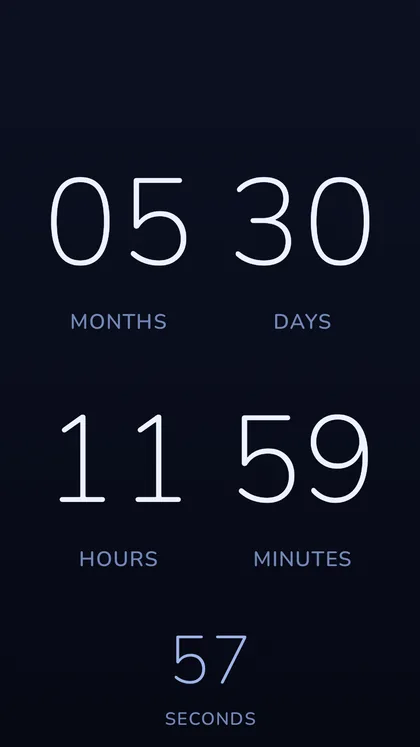
Months, days, hours and minutes for most of the year, with the seconds ticking underneath. From 18 November the seconds take the stage, and through the final hour a ring can sweep the numerals once a second.
-
02
Midnight
In the last ten seconds the digits come apart and reassemble, and the phone taps once a second. Then fireworks, with a celebration synthesised in the app — or Calm midnight, in silence. Through January the new year's numerals stay; the count starts again on 1 February.
-
03
Two widgets
The countdown and Year Progress, on your home screen. Nothing to configure.
-
04
The final hour
If you ask for it, one notification counts down in the shade through the final hour and is gone at midnight. Wake for midnight wakes the app for the stroke itself.
-
05
Make it yours
Five colour themes, seven countdown formats or Automatic, and a song of your own for midnight, with a head start, a fade and a balance against the fireworks. A demo mode plays midnight whenever you like.
-
06
Made for everyone
TalkBack reads the countdown as a sentence and announces the milestones. The animation follows Remove animations and battery saver, and the fireworks are capped for photosensitivity in the generator itself.
The Android edition
| Platforms | Android phones and tablets, two home-screen widgets |
|---|---|
| Requires | Android 8.0 or later |
| Category on Google Play | Lifestyle |
| Interface languages | 18 |
| Accounts | None. Nothing to create, nothing to sign in to. |
| Advertising and analytics | None. |
| Network access | None requested. The app has no internet permission and works offline. |
| Backup | Your settings are included in Android's own backup to your Google Account, if backup is on — the name of your song, not the song. None of it reaches us. |
| Notifications | One, in the final hour of the year, and only if you turn it on. |
| Price | Free, with no in-app purchases. |
| Privacy policy | Read |
Two permissions are asked for, each only when you turn on the feature that needs it: notifications, for the final hour, and alarms and reminders, to wake for midnight to the second. Every permission is listed in section 5 of the privacy policy; the app itself collects nothing.
Need help, or have an idea?
Questions, bug reports and feature requests are read and answered directly. Please include your device and system version — it makes a fix much quicker. One message is often all it takes: the detail you add today is what makes the next release better for everyone using the same app.