 For Android
Five-Year Diary
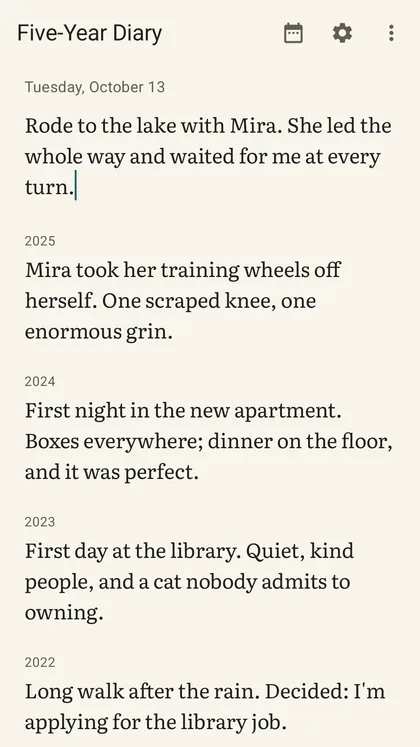
The paper five-year diary, made for Android. Write one line today; next year, on the same date, last year's line is waiting underneath it — then two, then three. With a daily reminder you can answer from the notification, and a home-screen widget.
What it does on Android
-
01
Every year on one page
Each date has one page, and each year adds a line to it, the newest at the top. Until there is a last year to read, the page shows nearby days instead — four weeks ago, a month ago, a hundred days ago.
-
02
Answered from the notification
Once a day, at the time you choose, a reminder shows what you wrote on this date in earlier years, and takes today's line right there in the shade.
-
03
The widget and the year
The home-screen widget shows this date in other years; a tap opens the day. The year view lays out twelve months, every day filled or empty — no streaks, no score, no badges.
-
04
Your words are a file
Every diary exports as plain text or Markdown, free, to any folder or cloud drive you choose. An old diary kept as dated lines in a text file can be brought in.
-
05
One purchase, once
Writing, the past years, the year view, the widget, the reminder, dark mode, the bin and plain export are free. One purchase, never a subscription, adds a question for every day of the year, a photograph with a line, more diaries, sealed copies, and three typefaces in three sizes.
-
06
Nothing to sign in to
No account, no server of ours, no advertising and no analytics. The diary stays on your phone, in Android's own backup if you have it on, and in the files you export.
The Android edition
| Platforms | Android phones, a home-screen widget |
|---|---|
| Requires | Android 8.0 or later |
| Category on Google Play | Lifestyle |
| Interface language | English |
| Accounts | None. Nothing to create, nothing to sign in to. |
| Advertising and analytics | None. |
| Network access | Only Google Play's: the purchase, the update check and the rating card. The app's own code opens no connection, and the diary works offline. |
| Backup | Your diaries, their lines and your settings are included in Android's own backup to your Google Account, if backup is on — the photographs are not. None of it reaches us. |
| Notifications | One a day, the reminder, at the time you choose, and only if you turn it on. |
| Price | Free to download, with one purchase inside — bought once, never a subscription. |
| Privacy policy | Read |
One permission is asked for, and only when you turn on the reminder: notifications. Google Play runs the purchase, the update check and the rating card, and in the United States the app asks Google Play for an age range, reads it and drops it; section 8 of the privacy policy says what Google collects for each. The app itself collects nothing.
A sealed copy opens without the app
A sealed copy is your whole diary in one file, every photograph included, locked with a passphrase. Its format is published, with a short reader in Python and its test vectors, all CC0 — so a sealed copy can be opened on any computer, without this app and without us.
Need help, or have an idea?
Questions, bug reports and feature requests are read and answered directly. Please include your device and system version — it makes a fix much quicker. One message is often all it takes: the detail you add today is what makes the next release better for everyone using the same app.
The address is support at lustigfairchild dot com.